On its way to the app stores · waiting list open
Your kumbu, under your control.
You know every day how much you can still spend. You plan the month in four steps, record what comes in and what goes out, and the app does the arithmetic for you.
One email, on the day the app reaches the stores. You can ask to be removed whenever you like.
Coming soon to
 Coming soon toGoogle Play
 Coming soon toApp Store
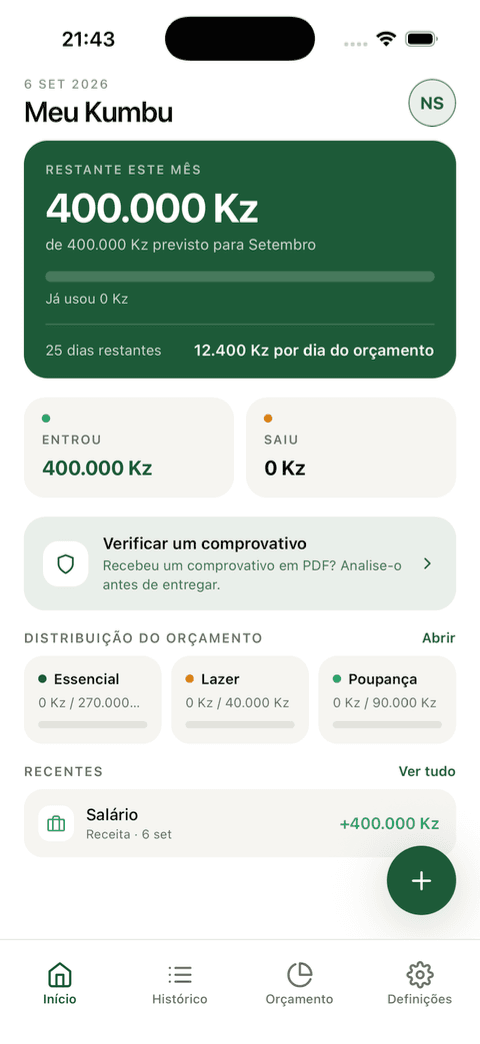
The month ends before the money does.
The salary comes in, the bills go out, and by mid-month nobody can explain where it went. The bank statement says what happened, but only afterwards.
Meu Kumbu tells you beforehand: how much you planned, how much you have already used and how much is left today. The number in the foreground is not the account balance — it is what you can still spend.
Plan the month in under two minutes
Four steps, on one screen. The balance left to allocate recalculates with every keystroke.
Step 1
Income
Salary, business, allowance, bonuses, investments.
Step 2
Essentials
Home, food, transport, health. What you have to pay.
Step 3
Lifestyle
Going out, subscriptions, entertainment. What is good to have.
Step 4
Savings
What stays with you. It comes out of the balance left to allocate, but it is not an expense.
Plan diagnosis
Five states, from «start with your income» to «balanced budget». It warns you if you have planned more than you earn.
Savings, two ways
A fixed monthly amount, or a target with a deadline — the app suggests the monthly figure and the field stays editable.
Draft picked back up
An unfinished plan comes back where you left it. Nothing is saved before you generate the budget.
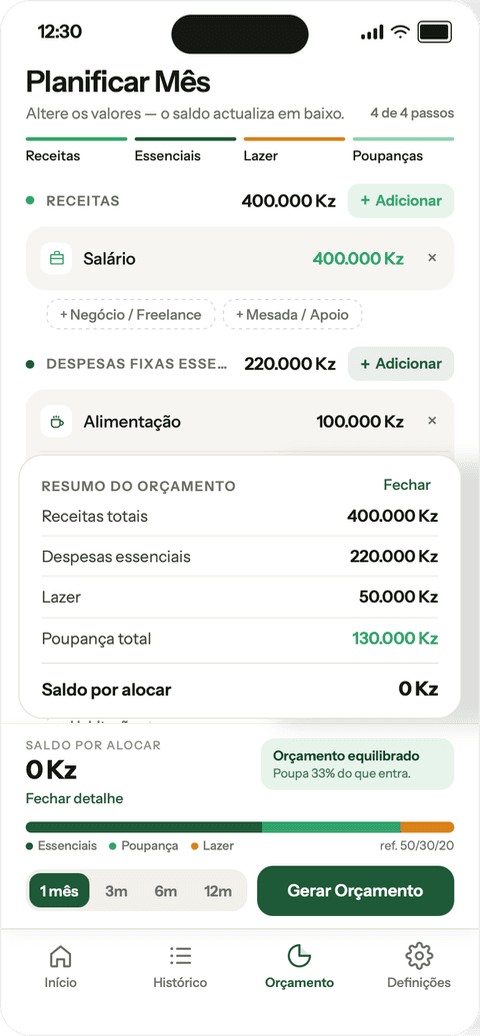
You know every day how much is left
The summary rebuilds itself with every entry. No waiting for the month to end.
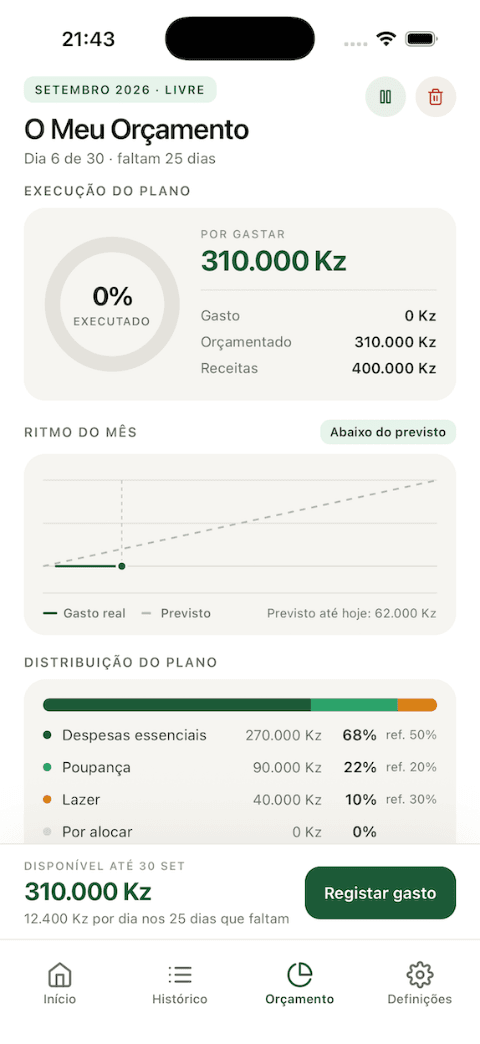
Execution ring
Spent, still to spend, over budget. By group and, once you open it, category by category.
Pace of the month
Real spending against what was planned up to today: on pace, above, below, or over budget.
Available per day
What is left divided by the days that remain.
Comparison with last month
«You saved 12% more than in August.» And milestones such as three months in a row within budget.
Before the expense is saved
- You will have 12,000 Kz left in Food this month
- You go 3,000 Kz past your Transport budget
- You have no budget for Health this month
The context appears before you confirm, not after. If you get it wrong, there is Undo.
Check a receipt before you hand anything over
The customer shows you a PDF of a transfer. The goods leave now; the money, if it comes at all, comes later.
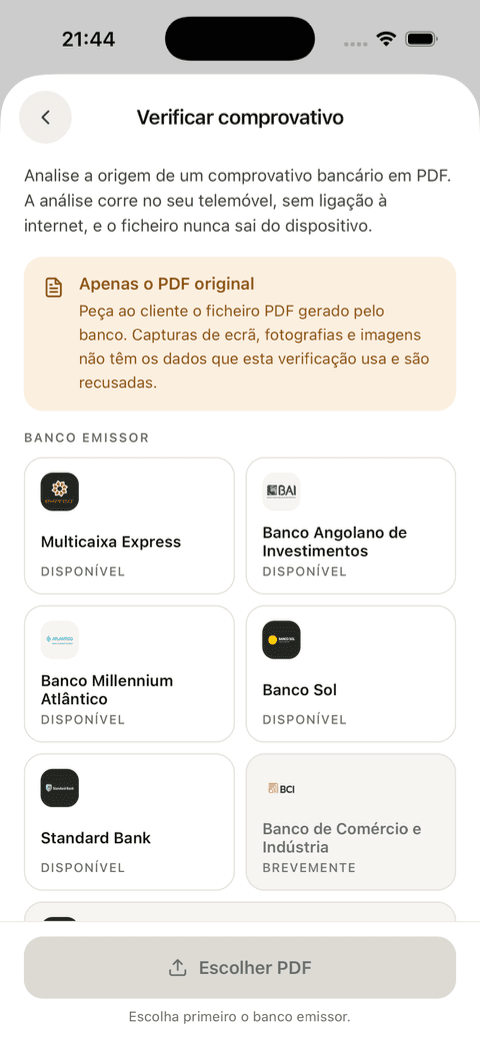
What the app analyses
Where the file came from: metadata, structure, size, page count and dimensions, digital seal, required fields and dates, compared against the profile of the issuing bank.
- Multicaixa Express
- BAI
- Banco Millennium Atlântico
- Banco Sol
- Standard Bank
Original bank PDF only
Screenshots and photographs are refused, with an explanation: they do not carry the data the analysis uses.
The file never leaves the phone
The analysis runs on the device, with no internet connection, and nothing is stored. It is the only part of the app that works without a network.
- Consistent
«Looks like a genuine receipt»
- Suspicious
«This receipt may have been altered»
- Inconclusive
«It was not possible to confirm»
A genuine receipt is no guarantee that the money arrived: the transfer may have been reversed, scheduled, or not yet cleared. Always confirm that the funds are available in the account.
Recording a transaction takes seconds
Amount, type, category, save. Description and date optional. Twenty-two fixed categories — six for income, sixteen for expenses — with search across the full list.
You see where the money went
Every transaction grouped by day, with filters by period, type and category, and search by description or category.
Your data
The app does not ask for access to bank accounts, cards or SMS. You type the numbers in yourself.
Isolation
Each account is authenticated and isolated in the database. Nobody reads anybody else's transactions.
Sharing
The data is neither sold nor shared with third parties, other than our infrastructure provider and where the law requires it.
Hosting
The infrastructure is hosted by our provider on AWS, possibly outside Angola.
Deletion
Deleting the account is immediate and final: it erases the profile, the budgets and every transaction. It cannot be undone.
A copy of your data
Ask for it by email at [email protected].
Account
You change the email or the phone number with your current password and a six-digit code.
Built for Angola

Kwanza by default
There is also Euro, Dollar and Rouble as a display label. The app does not convert currencies.
Angolan Portuguese
The default language. Also in French and English.
Real categories
Allowance / Support and Family / Support, both as income and as expense.
Angolan banks
Five bank profiles in receipt checking.
Common questions
What does it cost?
Can I download the app yet?
Do I need to connect my bank account?
Is my financial data safe?
Does the app work without internet?
How do I delete my account?
Join the waiting list
We are not in the stores yet. Leave your email and you will know the day we are.
Coming soon to
- Coming soon toGoogle Play
- Coming soon toApp Store